

Cleaning checklists
A kitchen cleaning rota your team finishes on the phone.
Set each task by area, how often it repeats, and the time it is due. Staff finish it on the phone with their name and a photo of the work. You can open that day’s checklist or print it.
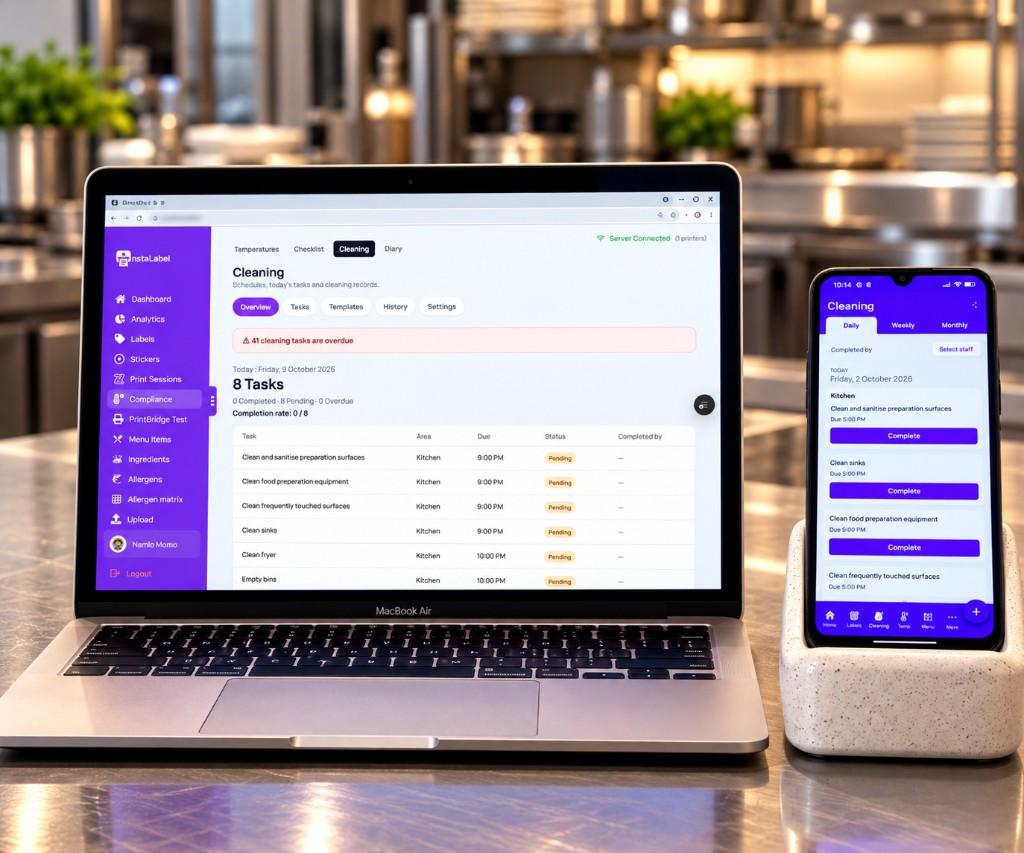
A task for the job, not a blank form
Group tasks by area, such as the kitchen, bar or dining room. Choose daily, weekly or monthly, or a one-off for a job that should not come back.
A weekly task runs on the days you pick. If a monthly date does not exist, it runs on the last day of that month. A one-off appears on the day you choose and leaves the working list once it is done. The diary still keeps who finished it.
Staff finish it during the shift
On the Android app they open the tasks that are due, choose their name, and take a photo of the finished work. An overdue task stays on the list until that duty is done.
The photo is kept for seven days. The completion, the name and the time stay in the diary after the photo has gone.
See one day, then print it
The dashboard opens one day at a time, up to today. You can see what was done, what was missed, and what is still open, then download that day’s checklist as a PDF.
One email when the day should be closed
If the end-of-day email is on, one message is sent at the time the kitchen chooses, in its own timezone. It lists cleaning tasks, checklist lines and temperatures still not done, and attaches that day’s diary.
The method still belongs to the kitchen
A completion records that a named person marked the task done. It does not choose the chemical, dilution or contact time, and it does not certify the kitchen.