

Choose the item. Check the details.
Menu items and ingredients stay in one place. Staff pick the job, review what is already saved, and print.
Explore the software
Loading InstaLabel…
Please wait while we prepare your experience

InstaLabel is kitchen labelling software for UK food businesses. Staff print labels from the ingredient, allergen and date information already saved. Use a printer installed on the computer, or the Android app with a supported Bluetooth printer. The same account keeps temperature records, cleaning tasks and the diary.
New subscriptions start with a 14-day trial. Payment details at checkout. No charge during the trial.
£15.99 a month. Until 10 January 2027, new customers can take 60 days free instead, and an annual plan also gets 30% off the first annual payment.
No printer in the box. Windows or macOS with PrintBridge, or Android with MUNBYN RW411B, Born4Ship DB403 or Rongta RP425.
Used in real Bournemouth kitchens, including Noodle Bar and Loco Lime.

Noodle Bar
A label looks like a small piece of paper. Behind it is information that needs to be right before the food moves on.
InstaLabel brings that information together and turns it into the labels your kitchen needs.
Give your team the information they need at a glance. From prep dates and use-by times to allergen information.


Handwritten
Printed
Label types used in the kitchen.
These are moments in a kitchen day, not a list of software features. The same saved information can be printed for each job.
Illustrative layout. Dates must follow your kitchen’s procedures.
Food prepared ahead of service gets a clear label with the information your team needs.
Explore prep labelsShowing Prep labels.
InstaLabel stores the information your kitchen already works from, then uses it to generate the finished label.
Your business sets the ingredients, allergens and date rules. InstaLabel applies those settings when it prints. It does not decide whether a label is legally compliant.
Menu items and ingredients stay in one place. Staff pick the job, review what is already saved, and print.
Explore the softwareSaved allergen information can be carried onto the label, with the ingredients that contain them emphasised.
Always check the current recipe and supplier information.
Illustrative PPDS layout from the InstaLabel label renderer, using bread, cheddar and butter with allergen emphasis. Not a production-ready label.
Explore allergen labellingYour business sets the date rules. InstaLabel applies those settings when generating labels, so the team sees a consistent format to check before printing.
Explore date labellingSchedule the cleaning tasks your kitchen already runs. Staff mark them done, and you can open that day’s checklist or print it.
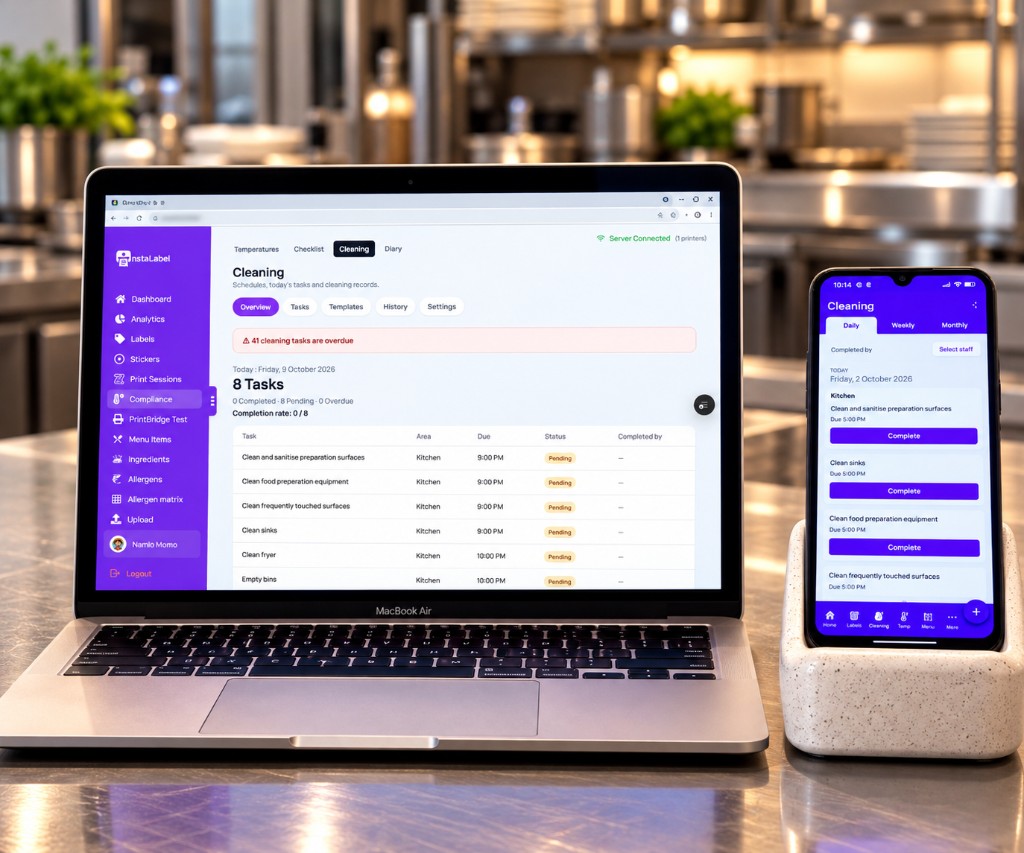
Daily, weekly or monthly tasks, grouped by area.
Staff choose their name in the app and mark the task done.
One checklist per day, a PDF of that day, and one diary email at the time the kitchen chooses.
It records the cleaning checks you set. It does not certify the kitchen.
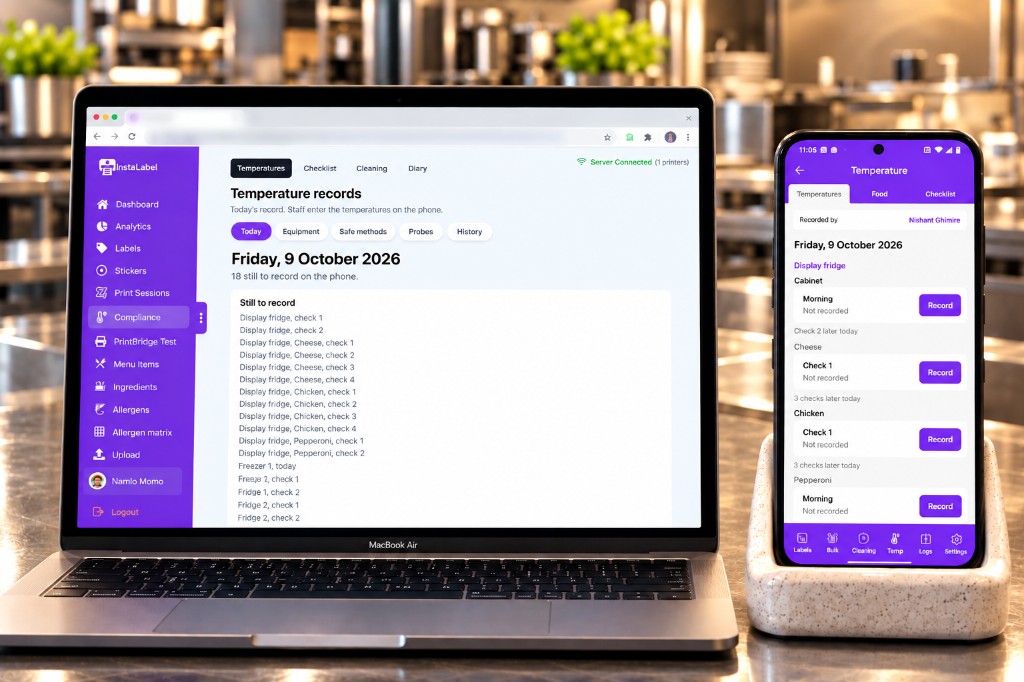
Staff enter equipment, food and delivery temperatures on the phone. The dashboard shows today’s record and what is still to enter. Those checks stay separate from the cleaning list and are included in the diary.
The same saved ingredient and menu information can also produce an allergen matrix. Review what is recorded, export the PDF and keep it with your team. Check it against current recipes and supplier information.
| Dish | CeCelery | GGluten | CrCrustaceans | EEggs | FFish | LLupin | MkMilk | MoMolluscs | MuMustard | NNuts | PPeanuts | SeSesame | SoSoya | SDSulphites |
|---|---|---|---|---|---|---|---|---|---|---|---|---|---|---|
| Cheddar sandwich | Celery not currently recorded | Crustaceans not currently recorded | Eggs not currently recorded | Fish not currently recorded | Lupin not currently recorded | Molluscs not currently recorded | Mustard not currently recorded | Nuts not currently recorded | Peanuts not currently recorded | Sesame not currently recorded | Soya not currently recorded | Sulphites not currently recorded | ||
| Fish and chips | Celery not currently recorded | Crustaceans not currently recorded | Eggs not currently recorded | Lupin not currently recorded | Milk not currently recorded | Molluscs not currently recorded | Mustard not currently recorded | Nuts not currently recorded | Peanuts not currently recorded | Sesame not currently recorded | Soya not currently recorded | Sulphites not currently recorded | ||
| Prawn linguine | Celery not currently recorded | Fish not currently recorded | Lupin not currently recorded | Milk not currently recorded | Molluscs not currently recorded | Mustard not currently recorded | Nuts not currently recorded | Peanuts not currently recorded | Sesame not currently recorded | Soya not currently recorded | Sulphites not currently recorded | |||
| Chicken satay | Celery not currently recorded | Crustaceans not currently recorded | Eggs not currently recorded | Fish not currently recorded | Lupin not currently recorded | Milk not currently recorded | Molluscs not currently recorded | Mustard not currently recorded | Nuts not currently recorded | Sesame not currently recorded | Sulphites not currently recorded | |||
| Apple crumble | Celery not currently recorded | Crustaceans not currently recorded | Fish not currently recorded | Lupin not currently recorded | Molluscs not currently recorded | Mustard not currently recorded | Peanuts not currently recorded | Sesame not currently recorded | Soya not currently recorded | Sulphites not currently recorded |
Recorded as presentBlank: no allergen currently recorded
Review the matrix against current recipes and supplier information. A blank cell does not mean allergen-free.
Example matrix generated from demonstration records. Always check your own recipes and supplier information before use.
See the allergen matrixInstaLabel supports two label formats. Choose the size that fits your printer, workflow and the amount of information you need to display.
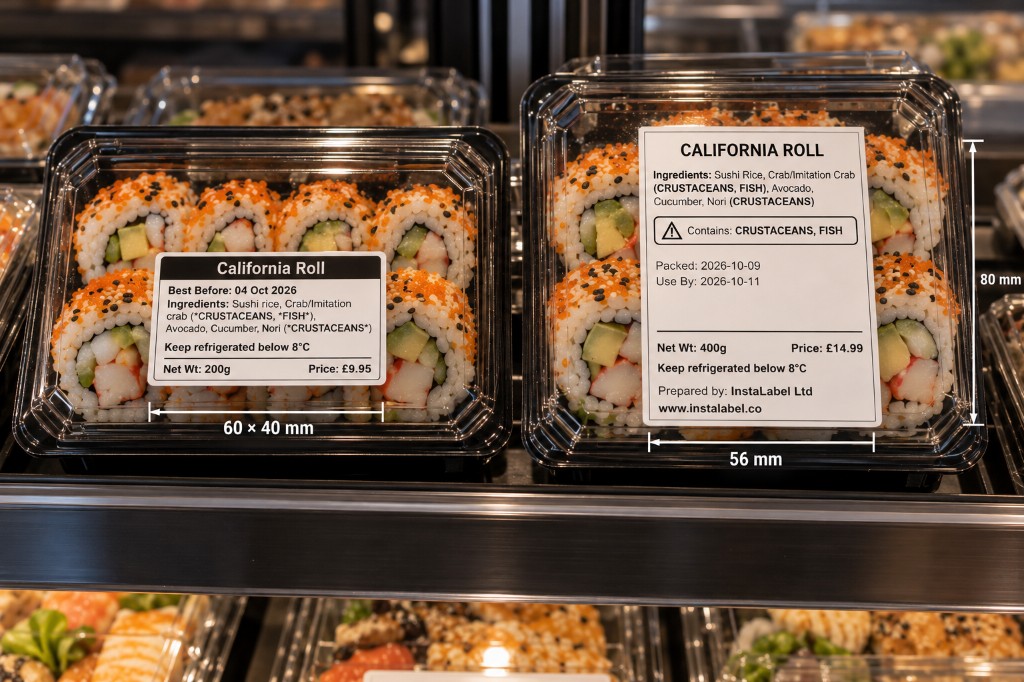
60 × 40 mm
A smaller footprint for everyday kitchen labelling.
56 × 80 mm
More room when a label needs a longer ingredient list or extra detail, including PPDS.
Two formats. The same InstaLabel workflows. Different layouts. Both sizes support default, prep, cooked, defrost, use-first and PPDS labels. InstaLabel formats the information to suit the selected size.
Use a computer with PrintBridge, or the Android app with a supported Bluetooth printer.
Showing computer printing setup.
Use InstaLabel in your browser. PrintBridge connects it to a label printer installed on your Windows or macOS computer.

You don't need to build everything from scratch. Import your existing information, review it, configure your labels and start printing.
Importing does not check that ingredients or allergens are correct. Review recipes and supplier information before you print.
See how importing worksNeed to talk through your kitchen’s setup?
Let’s walk through itStart a free trial, or book a demo to walk through your printer and the labels your team needs.